Meow Seq / MIDI sequencer

Meow Seq

Two machines. Endless detours.

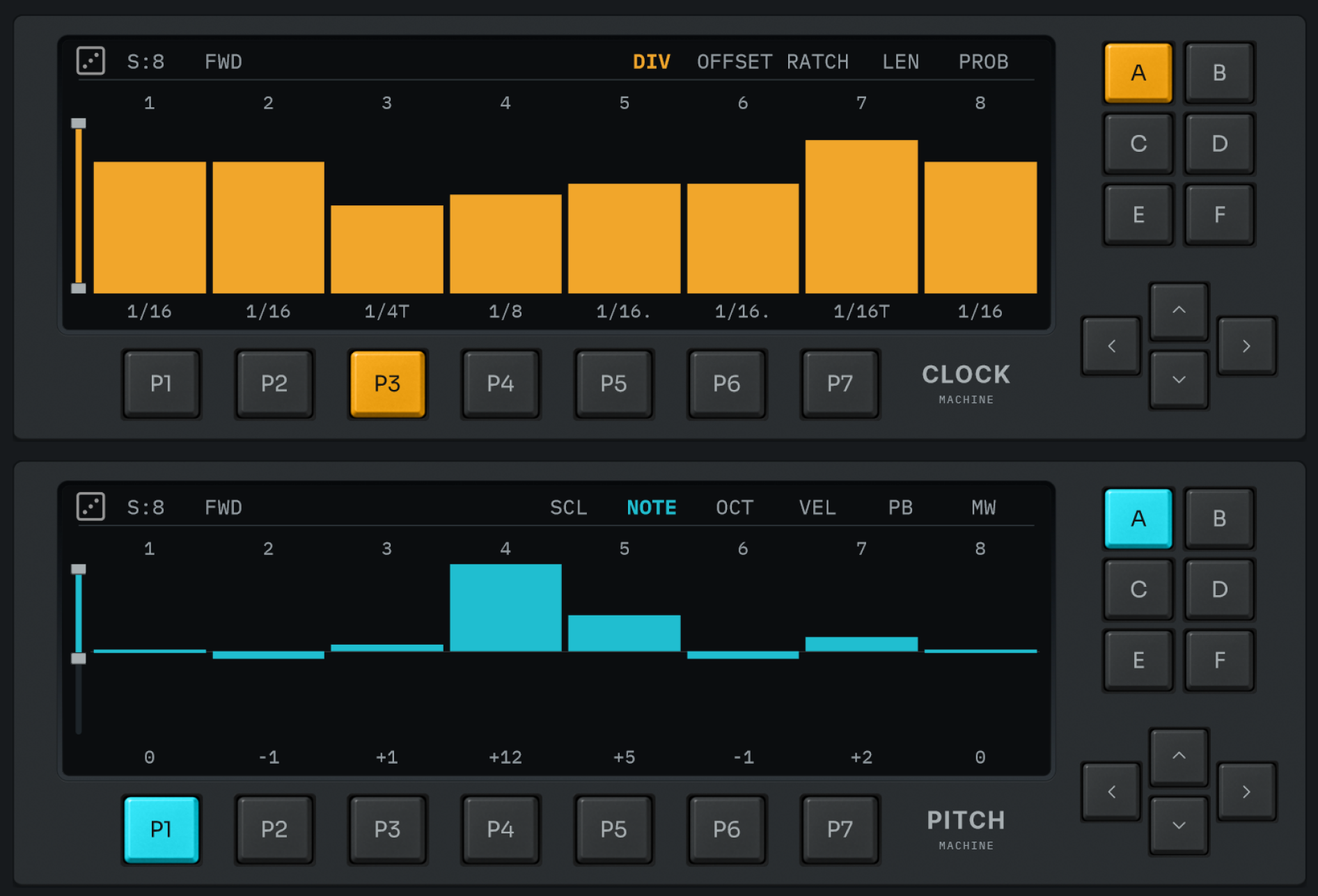
Timing on top. Pitch below. Ten independent sequencers that drift against each other, both playable while your track runs.

Buy Meow Seq · $19 ↗

Win + Mac / VST3 · AU · CLAP

Full plugin trial / No account needed

Meow Seq interface
A new look. The same open-ended sequencing.

01 / Timing + pitch

Together. On their own terms.

Five sequencers in each machine. Each has its own pattern, step count and play mode, so the parts can drift instead of always looping together.

Clock machine detail

Clock machine / Timing

Decide when.

The clock machine controls when notes happen and how long they last. Change the timing while the pitch keeps moving.

Pitch machine detail

Pitch machine / Notes

Decide what.

The pitch machine controls which notes play and how. Give it a different pattern length to discover new combinations.

02 / Shape the pattern

Keep your hands in the music.

01

Choose your scale.

Draw a scale on the keyboard, then transpose it live with MIDI.

02

Leave room for chance.

Randomise each sequencer within a range you choose. Keep the useful surprises.

03

Play it from hardware.

Map banks, tabs, direction and dice to MIDI notes or CC knobs.

04

Let the track take over.

Automate patterns, banks, step count and direction from your DAW.

03 / Hear it in context

Less explaining. More playing.

Meet Meow Seq in a short teaser: key features and sequences made using different techniques. Explore the clips and tutorials below for more.

Meow Seq teaser
Transpose with MIDI
Build an arp-style sequence
Play in phrase mode
Sequence a hardware synth

Learn how to use it.

Meow Seq · Sequencing tutorial
Meow Seq · Scale and randomise features
“I own quite a few sequencers, and I found this one was easier to come up with nice evolving sequences fast, without much hassle. Just using random and fine-tuning a few things, it was giving me useable stuff within minutes.”
Bob Swans / Producer & Sound Designer / Red Laser Records

04 / Try it for yourself

Start with a happy accident.

The trial is the full plugin. Download it without an account and try it in your own setup.
Buy Meow Seq · $19 ↗

Windows + macOS / VST3 · AU · CLAP

Try Meow Seq

Choose your installer.
Full plugin trial. No account needed.

Meow Seq version history

Current release / v1.2.10

v1.2.10October 8, 2026
  • Improved preset spacing, dividers, and undo/redo alignment across themes.
  • Widened the settings scrollbar and fixed a small gap beside it.
  • Saving a bank now also selects it.
v1.2.9September 29, 2026
  • Cosmetic improvements across the interface.
  • Improved reliability of right-drag step selection.
  • Refined and shortened the manual, with a new table of contents.
  • Simplified installation downloads and clarified macOS installer guidance.
v1.2.8September 25, 2026
  • Three new themes added.
  • Arrow buttons for presets.
v1.2.7September 7, 2026
  • Added per-sequencer MIDI mapping for patterns, nudge arrows and randomize, with shared notes across sequencers.
  • Bank Save now defaults to Manual for new instances. Bank Save, BPM Mode and Play Mode are saved with projects and remain unchanged when loading presets.
  • Improved mapping tooltips and updated the manual.
  • Code optimizations for better performance and reliability.
v1.2.6August 25, 2026
  • Fixed a bug where a muted NOTE step was forgotten on reload, and could carry over into the next preset you loaded and silence a step that never had one.
  • Fixed a bug where, with ROBS armed and quantize off, the step light stayed lit on a position the sequencer had already left. Bank changes were affected the same way.
  • A few tooltips reworded for clarity.
v1.2.5August 22, 2026

Major

  • Ratchets now go up to 8 hits, named by how many hits the step plays. Existing patterns sound the same, they just read one number higher.
  • New look: bars are lightly graded rather than flat, and the clock machine's pinks are richer.
  • Active bars now light up, and can be switched off in settings.
  • Steps sitting at their middle or lowest value, like NOTE, OCT and DIV, now draw a small block there instead of nothing.
  • Fixed a bug where changing pattern with Quantize set to Off cut the playing step short, so quick pattern switches ran the sequencer faster than the DIV lane says it should.
  • Fixed a bug where a direction change took hold one step late, playing one more step the old way before turning around.

Minor

  • Updated manual, covering the new ratchet values and edit mode.
  • Settings: the update check has moved to INFO, next to the version it checks.
  • Settings: the User row is gone from LICENSE. Your licence details are behind View License.
  • Improved tooltip text.
  • Fixed a bug where the step indicator stayed on the step of the sequencer tab you had just left until the next step arrived.
  • Fixed a bug where the nudge arrows and the randomize dice acted on the playing pattern instead of the one open in edit mode.
  • Fixed a bug where ctrl+clicking the dice also rolled it. Ctrl+click now only cycles the scope.
  • Fixed a bug where ctrl+clicking a bank pad to save it also switched to that bank.
  • Fixed a bug where a pattern button could keep blinking after a quantized change had already landed.
  • Fixed a bug where a quantized bank press recalled the bank twice.
  • Fixed a bug where a clock bank change from MIDI or automation did not blink the pattern button, the way the melody machine does.
v1.2.3August 20, 2026

Major

  • CLAP versions are now included. Pitch bend now works correctly in Bitwig.
  • DIV values increased to 17 divisions including dotted and triplet values.
  • Steps can now be selected. Right-click and drag across the step bars to select a run of them, then drag any one of them to move the whole selection together, keeping the shape you drew. Randomize rolls only the selected steps.
  • Patterns, banks, the scale slot, step count and direction now appear in your DAW as automatable parameters.
  • New Undo and Redo buttons.
  • New option for saving banks manually. This gives you more control of what they hold and make them recallable.

Minor

  • New updated manual, now included with the plugin and available from the settings menu.
  • Step-count, direction and randomize now have a right click menu for setting scope. Scope is now labeled M and G (Machine and Global).
  • Settings shows an update button when a newer version is available.
  • The settings panel is restyled so headings, labels and values are easier to tell apart.
  • The settings button now says View License or Activate License depending on whether the plugin is activated.
  • Right-click menus are smaller. The text matches the settings panel and the rows are tighter.
  • Improved presets menu sizing.
  • Tooltips now report the current value in cyan, and modifier hints in yellow brackets. Bank pads say which page and bank they belong to.
  • Improved tooltip text with color codes.
  • Hovering the step bars now names the sequencer you are looking at, the way the pattern buttons do.
  • Slider sensitivity fine tuned for the step-count and direction sliders.
  • Mutes now travel with their steps when a pattern is nudged left or right, and muted steps can be edited and selected like any other.
  • Removed internal CC knob control from MIDI map menu as this is now better handled via DAW automation.
  • Removed the MIDI input channel setting as this is now better handled by the host.
  • macOS now needs 10.15 or newer.
  • Fixed a bug where step values jumped if you pressed or released Shift part way through a drag.
  • Fixed a bug where releasing Shift during a drag left it in fine mode for the rest of the drag.
  • Fixed a bug where MIDI-mapped randomize, nudge and rotate did nothing while the plugin window was closed.
  • Fixed a bug where MIDI-mapped scale slots did nothing while the plugin window was closed.
  • Fixed a bug where the first hit of a ratchet ran too long, making a group sound like one fewer hit, or at short divisions like it never fired at all.
  • Fixed a bug where playing a note while a MIDI map slot was waiting for one also moved the scale root or restarted the phrase.
  • Fixed a bug where presets carried the window size they were saved at.
v1.1.0July 22, 2026
  • New Scale mode. The Pitch machine can now lock its output notes to a musical scale. Open the SCL tab to draw scales on the on-screen keyboard, save and recall them using patterns and banks. The keyboard highlights the note that's currently playing, and the left/right nudge arrows shift the whole scale up or down.
  • New Randomizer. Every sequencer now has a dice button with a range slider beside it. Click the dice to fill the current sequencer's steps with random values, and use the two-thumb slider to set how high and low those values can go (hold Shift while dragging to move the whole range at once).
  • More controls can now be MIDI-mapped. In addition to the banks, you can now assign MIDI notes to the sequencer tabs, the direction/nudge arrows, the sequencer navigation, and the new randomize (dice) button. Use the MIDI Map button as before.
  • Added hardware-knob control. The step-count and direction sliders can now be driven by an external MIDI controller. New "CC Knob Mode" and "CC Sensitivity" options in Settings let you match absolute knobs or endless encoders.
  • Fixed a bug where Velocity and Mod Wheel steps could only reach 126 instead of the full 127.
v1.0.4July 9, 2026
  • Fixed a bug where Local and Global scope modes were not working with the step count slider.
v1.0.3June 13, 2026
  • Fixed occasional visual glitches on the buttons and controls.
  • Improved step-light behaviour. General reliability fixes to how the step indicator lights light up and turn off, so they track playback more accurately.
v1.0.2June 5, 2026
  • One MIDI note can now be mapped to banks of both machines, effectively changing the entire state.
  • Fixed a bug with saving presets. Saving from Init preset now prompts a Save as dialog.
v1.0.1June 2, 2026
  • Added tooltip explaining Shift+drag for precision editing in the sequencers.
  • Plugin window size is now saved and restored between sessions.
  • Fixed a bug where clicking and dragging on a muted step could unintentionally modify adjacent steps.
v1.0.0May 27, 2026
  • Initial release.